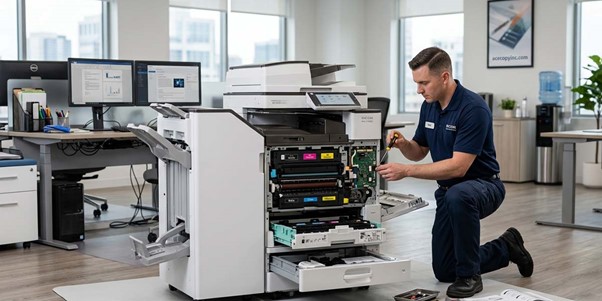
When your office copier or printer starts acting up, it’s easy to get frustrated. Faded prints, paper jams, or frequent errors can disrupt workflow and slow down productivity. That’s why calling in a professional repair service like Ace Copy Inc. can make all the difference. With certified technicians and brand-specific expertise, they not only fix the immediate issue but also help prevent future problems.
Thorough Diagnosis Before Any Repair
When you schedule a service call with Ace Copy Inc., the process always begins with a detailed diagnostic check. Whether you need Ricoh copier repair near you or Ricoh printer repair, our technicians take the time to fully assess the machine instead of jumping straight into repairs.
Using advanced tools and hands-on expertise, they review error codes, inspect internal components like drums and rollers, and test overall performance. Since Ace Copy Inc. services multiple brands such as Canon, HP, Copystar, Kyocera, Lexmark, and Ricoh, our team understands the unique systems behind each machine.
This approach helps them spot the real issue right away. What looks like a simple toner problem could actually be a worn-out part or a calibration issue. By getting the diagnosis right from the start, they avoid unnecessary fixes and ensure a smoother, longer-lasting repair.
Expert Repairs with Genuine Parts
Once the issue is identified, the next step is repair. Ace Copy Inc. emphasizes using genuine Ricoh parts for both copiers and printers. This guarantees compatibility, reliability, and longevity.
Our technicians are trained on the unique mechanisms of Ricoh machines. Whether it’s clearing a stubborn paper jam, realigning printheads, or replacing a worn fuser, they know how to handle it safely and efficiently. This level of expertise ensures your machine returns to peak performance.
Additionally, professional repair extends beyond mechanical fixes. Firmware updates and software recalibration are also part of the service. These updates help your Ricoh printer or copier communicate better with your network, prevent recurring errors, and maintain consistent print quality.
Preventative Maintenance to Avoid Future Problems
Repair doesn’t end with fixing the immediate issue. Ace Copy Inc. offers preventative maintenance to keep your equipment running smoothly. This includes:
- Cleaning internal components to prevent toner buildup
- Lubricating moving parts to reduce wear
- Checking alignment and calibration for clear prints
- Inspecting sensors and rollers to avoid paper jams
Regular maintenance reduces downtime and prolongs the life of your copier or printer. It also ensures your office continues producing professional-quality documents without interruptions.
Benefits of Choosing a Professional Service
When you opt for a certified service provider like Ace Copy Inc., you get several advantages:
- Reliable Repairs – Technicians know the machines inside out. Every repair is precise and backed by experience.
- Genuine Parts – Only authentic Ricoh parts are installed, protecting your warranty and machine performance.
- Time-Saving – Quick and accurate diagnosis means less waiting and more productivity.
- Preventative Care – Regular maintenance prevents costly breakdowns in the future.
- Peace of Mind – You know your equipment is in expert hands, allowing your team to focus on work.
Signs You Should Call a Professional
Even minor issues can signal larger problems. You might notice:
- Faded or streaky prints
- Frequent paper jams
- Error codes or warning lights
- Slow printing or inconsistent output
- Connectivity issues on networked devices
If any of these appear, scheduling a Ricoh copier repair near you or Ricoh printer repair right away can prevent a small inconvenience from turning into a costly repair.
Quick Tips While Waiting for Service
While waiting for professional service, there are a few steps you can take to avoid worsening the problem:
- Don’t continue printing on damaged paper
- Avoid DIY repairs that could void your warranty
- Keep the machine clean and dust-free
- Note any error codes or unusual behavior to help technicians
These steps make the repair process smoother and faster.
FAQs
- How long does a Ricoh copier or printer repair usually take?
Repair times vary depending on the issue. Minor fixes like replacing a toner cartridge may take less than an hour, while complex mechanical repairs could take a day or two. Ace Copy Inc. keeps clients updated throughout the process. - Do professional repairs affect my warranty?
Using certified technicians and genuine Ricoh parts ensures your warranty stays intact. Avoiding unapproved repairs prevents voiding manufacturer coverage. - Can maintenance prevent future breakdowns?
Yes. Regular preventative maintenance helps identify wear before it causes failure, keeping your equipment reliable and extending its lifespan. - How do I know if my machine needs a professional or just a simple fix?
If issues persist after basic troubleshooting like replacing toner or clearing paper jams, it’s best to call a certified technician. They can diagnose hidden problems you might not see. - Does Ace Copy Inc. provide on-site service?
Yes. Technicians can visit your office to perform diagnostics, repairs, and maintenance, minimizing downtime and ensuring machines are fully operational before leaving.
Don’t let faded prints or constant errors slow down your office. Contact Ace Copy Inc. today for expert Ricoh copier repair near you and Ricoh printer repair.
Our certified technicians provide fast, reliable service that keeps your equipment running smoothly and your business productive. Call now to schedule a service visit and experience professional care that makes your office printing stress-free.